For the software of my home server I was between two main options, mainly TrueNAS and Unraid. Both mainly operating as Network Attached Storage, but being able to utilize dockers and virtualization. I ended up going with Unraid, even though TrueNAS is completely free, because of:
- More intuitive and smaller learning curve – important to me as this was my first time doing networking or configuring such software
- XFS file system would allow me to build my array with different size hard drives, and I could expand it in the future if needed
Before I let you see my current Unraid docker stack, a few mentions that often go unmentioned
- Safety is crucial! I set up my networking in a particular way that I did not need to open ports on my home router (utilizing VPN services like Tailscale, and Cloudflare Tunnels), as well as configuring Crowdsec to monitor and ban suspicious or known bad IP addresses trying to access my server.
- This needed to be a bit of a workaround, where I routed all my traffic from Cloudflare to NginxProxyManager and had it access all my docker containers. Otherwise Crowdsec could not see the traffic from Cloudflare effectively (to my current understanding).
- Plan ahead! Think how you want your folders to look and function, who should and should not have access to them. Having at least some hierarchy in mind before configuring everything saves a lot of hassle or risk later on. There are few good or bad answers, just have to be mindful of how you want to store your own information.
- Backup, backup, backup! If you are setting up a server, please utilize it for backups of external devices like a laptop and a phone, but do not forget to have backups of internal databases and important information. Even if you have parity or mirror set-up for your storage drives.
Now my Unraid setup has grown to be huge and I utilize it daily
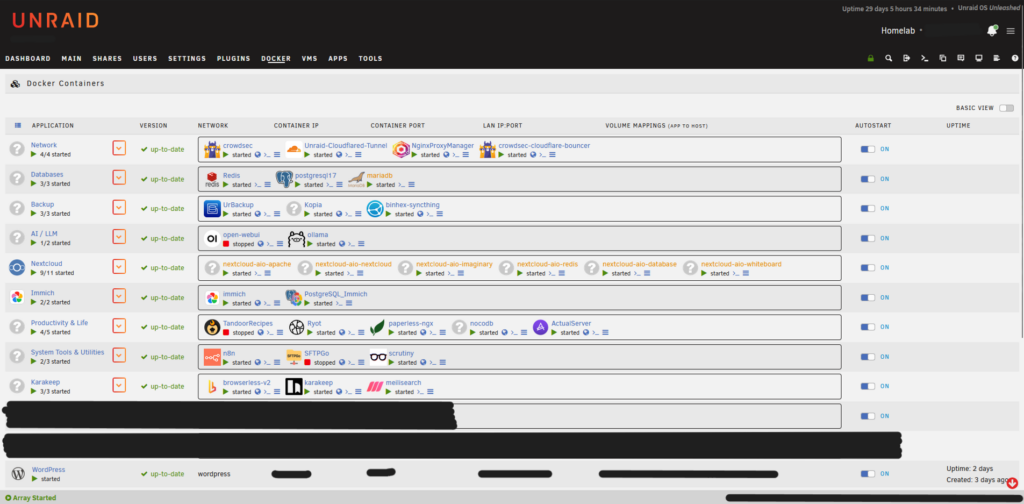
Some of my most beloved applications that I self-host:
UrBackup -> automatic backups of my laptop to the server
Immich -> self hosted photo backup (Google photos without giving your data away to Google)
Nextcloud -> full office and drive suit (I use it as my own private Google drive)
n8n -> I run multiple automation pipelines utilizing other containers like Ollama for local LLM usage